Stop manual data entry. Let your calls update HubSpot for you.
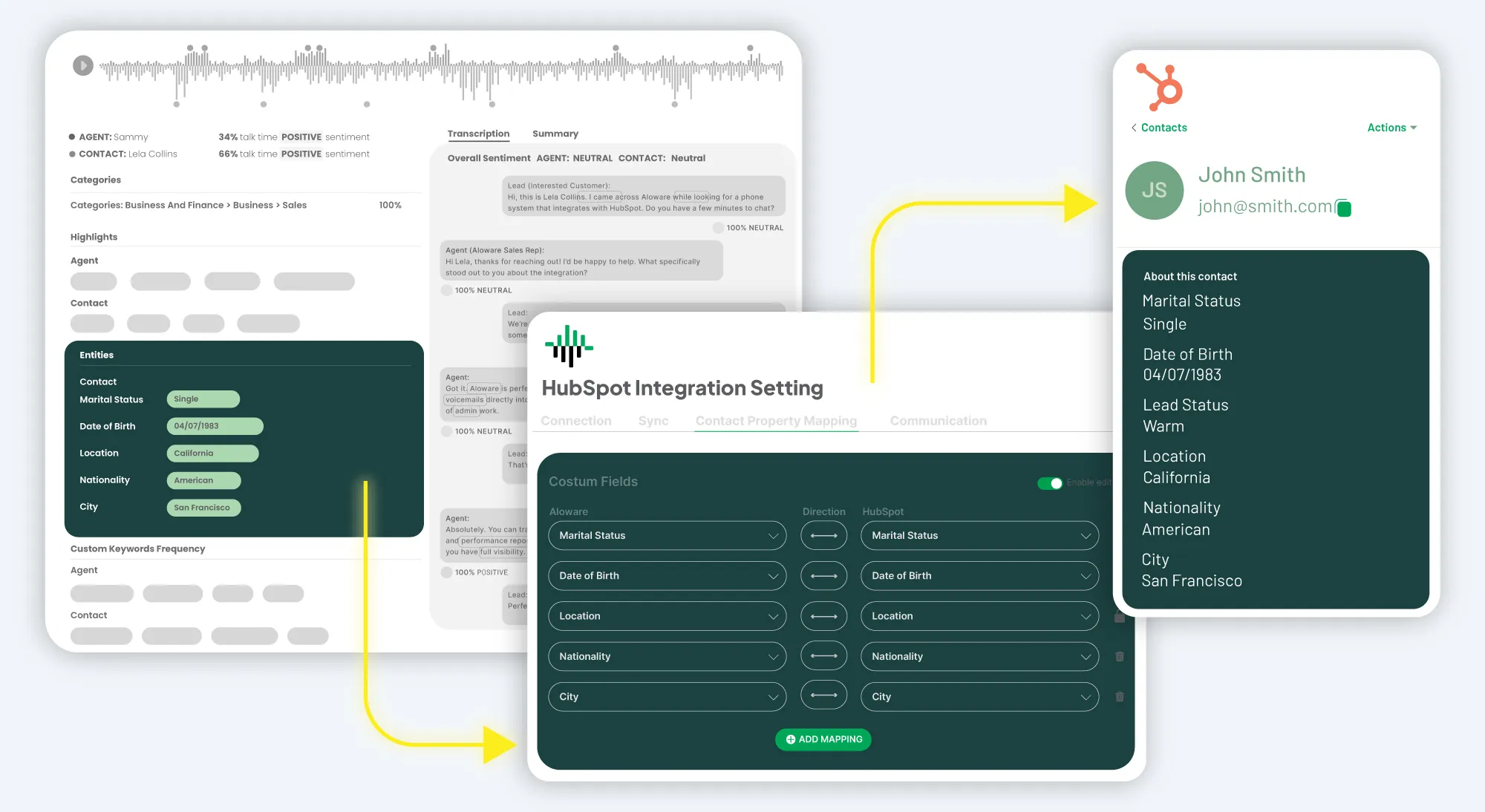
AloAi listens to every call, pulls out what matters, and writes it into HubSpot — Contacts, Deals, and the custom fields your team actually qualifies on. Your reps don't touch a thing.


.webp)


.webp)
.webp)
.webp)
.webp)
.webp)
.webp)
.webp)
.webp)
.webp)
.webp)
.webp)
.webp)
.webp)
.webp)
.webp)
.webp)
.webp)
.webp)
.webp)
.webp)
.webp)
.webp)
.webp)
.webp)
Frequently Asked Questions
What is automated entity mapping?
Automated entity mapping is an AI feature that listens to your sales calls, picks out specific pieces of information (called "entities" — things like job titles, company names, locations, or product mentions), and automatically writes them into the matching fields on your CRM contact record. Instead of your reps typing what they just heard, the AI does it for them — accurately, instantly, and on every call. In Aloware, this runs inside AloAi Voice Analytics (AVA) and currently syncs into HubSpot properties.
How does it work?
Three steps, all automatic. First, AVA transcribes the call as it happens. Second, it scans the transcript for entities you care about — job title, organization, occupation, location, custom keywords — using natural-language processing. Third, it writes those values to the HubSpot properties you've mapped them to, with a "Last Synced" timestamp on every entity so you can tell exactly when each field was updated. Your reps don't touch a thing.
What kinds of entities can AVA detect?
Out of the box, AVA recognizes the standard set you'd expect — names, organizations, occupations, job titles, locations, dates, monetary amounts, phone numbers, emails. You can also configure it to capture more specific things your business actually cares about: nationality, medical conditions, vehicle IDs, policy numbers, project budgets, whatever comes up in your conversations. If a customer says it on the call, AVA can capture it and route it to the right HubSpot field.
Does it only work with HubSpot?
Today, the automated voice-to-CRM property sync is built specifically for HubSpot — which is why the footnote on this page requires the HubSpot integration plus AloAi Voice Analytics. Aloware integrates broadly with Salesforce, Pipedrive, Zoho, GoHighLevel, and others for call logging and activity sync, but the field-level entity mapping currently targets HubSpot. If Salesforce-side entity mapping matters to you, talk to sales — it's a frequent request and they can share the latest roadmap.
How accurate is the data?
The data is pulled directly from the transcript of the conversation — not from a rep's memory or hand-typed notes after the fact. That eliminates the two biggest sources of CRM error: forgotten details and typos. You can verify any entity by listening to the original recording or reading the transcript, and the "Last Synced" timestamp tells you exactly when the value was captured.
Will it overwrite my existing CRM data?
Not unless you want it to. By default, AVA enriches the fields you've explicitly mapped to it and leaves standard mappings alone, so you keep full control over which properties get touched. You can configure each mapping to either always update, only fill blanks, or require admin approval before writing — your rules, your decision.
Can I control which entities map to which HubSpot fields?
Yes — every mapping is configured by an admin, not by the AI. You choose which AVA-detected entities (Organization, Occupation, custom keywords, etc.) go into which HubSpot properties, and you can change the mappings any time. Nothing gets written to a field until you've explicitly mapped it.
How is this different from AI call summaries?
Call summaries give you a paragraph at the end of the call; entity mapping gives you structured, queryable data on the contact record itself. With a summary, you still have to read it and update fields manually. With entity mapping, the fields are already updated — meaning your HubSpot reports, segmentation, lead scoring, and workflows can actually use the data immediately, without anyone re-entering anything.
Do I need caller consent for AVA to do this?
You should follow whatever call-recording laws apply where your reps and customers are calling from — one-party-consent states, two-party-consent states, GDPR jurisdictions, and so on. AVA works on top of Aloware's standard call recording, so your existing recording-disclosure and consent practices cover entity mapping too. Aloware provides built-in tools for recording disclosures and consent prompts; check with your legal team on which apply to your geography.
How do I turn entity mapping on?
Two prerequisites: Aloware's HubSpot integration must be connected, and AloAi Voice Analytics must be enabled on your account. Once both are in place, an admin opens the entity-mapping settings, picks which AVA entities map to which HubSpot properties, sets the update rules (always, blanks only, approval required), and turns it on. New calls start syncing immediately — no backfill or data migration needed.

.svg)
Ready to Retire Manual Data Entry?
Stop typing what you just heard. Enable AloAi Voice Analytics today and watch your HubSpot fields update themselves automatically.
*Requires HubSpot Integration + AloAi Voice Analytics enabled